Best Nest Camera Buying Guide — Black Friday Deals 2026
Where will a Nest camera need to work: near an outlet indoors, in a spot where flexible placement matters, or beside an entrance where light could help you notice activity? That practical question is a better starting point than a Black Friday headline. The three options here differ in power, image detail, and what they add beyond a camera view. Use the guide to match those details to the place and routine you have in mind, then check that the exact Black Friday listing names the model and configuration you intended to compare.
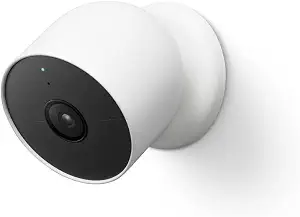
Google Nest Cam Outdoor or Indoor, Battery – Wireless Security Camera
Google Nest Cam Outdoor or Indoor, Battery – Wireless Security Camera (ASIN B09FCMSJZG)
Best Overall is an editorial fit for shoppers who want a camera that can be placed without making a nearby outlet the first constraint. This Nest Cam is battery powered, and its listing describes it for outdoor or indoor use. That can suit a view across a yard, by a doorway, or in a room where a corded placement would be awkward. Before choosing a spot, consider where the camera can provide the view you need and whether you can access it for battery-related upkeep; the provided details establish battery power but do not specify battery life or charging intervals.
For image and event information, the camera offers 1080p HDR video with night vision. It can tell the difference between a person, animal, and vehicle, giving activity alerts more context than a generic event description. Those details answer separate questions: how the view is presented and what kinds of activity the camera can distinguish. If you are comparing it with another Nest camera during Black Friday, decide which of those matters more for your intended location rather than treating one specification as a substitute for the other.
The included event history is 3 hours of free event video history. If you want a longer period to review, a Nest Aware subscription, sold separately, provides up to 60 days of video history. The camera can also store up to an hour of recorded events when offline. Think about whether you usually check alerts promptly or might want to look back later, and include any subscription cost in your own purchase calculation rather than assuming it is part of a Black Friday offer.
The temperature range is –4°F to 104°F (–20°C to 40°C), a useful specification to check against the conditions at the planned location. This is the strongest all-around fit among these three when placement flexibility and a broad set of everyday camera details are priorities, which is why it carries the Best Overall label. That label is a buyer-fit recommendation, not a claim of measured superiority. On Black Friday, confirm the listing is for the battery-powered outdoor or indoor model, and compare the complete offer—including any separately sold service you may want—before deciding.
Key specs
Detection
can tell the difference between a person, animal, and vehicle
Video
1080p HDR video[1] with night vision
Event history
3 hours of free event video history[2]
Optional video history
add a Nest Aware subscription (sold separately) for up to 60 days of video history[3]
Offline event storage
store up to an hour of recorded events
Power and placement
it’s battery powered, so you don’t need to set it up near an outlet
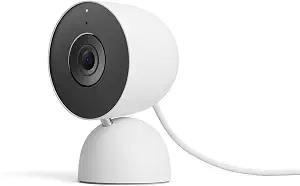
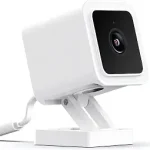
Best Budget is the editorial label for this wired indoor option, a fit for shoppers whose plan is to monitor a place inside and keep the camera connected to corded electric power. Its product name identifies it as the Indoor (Wired, 3rd Gen) model in Snow. That makes the placement question straightforward: choose a spot where a wired connection works for your setup, rather than selecting a location first and assuming battery operation. The label is not a promise about the current price; Black Friday listings can vary, so compare the exact model and offer details before deciding whether it fits your budget.
The listed image detail is 2K HDR video, and the camera also has night vision. If you are deciding between this and a 1080p HDR option, consider which model’s other attributes fit the intended job as well as the resolution descriptions. A camera’s image specification does not by itself settle how you want it powered, where it will go, or how you will respond to activity. The supplied details do not give a basis for claims about relative image quality, so use the stated video formats as comparison points rather than assuming an outcome.
Two-way audio is another reason to shortlist this model for a room where listening and speaking through the camera would be useful. It could make sense when you want a camera setup that includes conversation as well as viewing, provided that function suits your routine. A green LED indicates when the camera is processing or streaming video. The security details list encrypted video, two-step verification, and enhanced security through your Google Account; consider those stated protections when reviewing the product information, without treating them as a substitute for checking your account settings.
This camera’s key tradeoff is clear from the supplied specifications: it is wired and corded electric, rather than described as battery powered. That may be a sensible exchange if the indoor location already works with a corded setup and you value the listed 2K HDR video and two-way audio. The Best Budget label means it is a budget-oriented pick within this guide, not a guarantee that it has the lowest Black Friday price. Verify the exact Snow, 3rd Gen wired variant and the complete listing before purchasing.
Key specs
Video
2K HDR video
Night vision
see in the dark with night vision
Audio
2-way audio
Connectivity
Connectivity Technology Wired
Power
Power Source Corded Electric
Security
encrypted video, two-step verification, and enhanced security through your Google Account
Status indicator
green LED light lets you know when it’s processing or streaming video
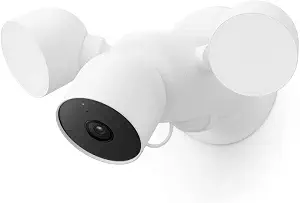
Best for activity-triggered lighting is the most direct fit for someone who wants a floodlight as part of the camera setup. This Nest Cam’s light automatically turns on when there is important activity, bringing illumination into the decision alongside video and alerts. Picture where that function would be useful—such as an outdoor approach you want lit when activity occurs—and make sure the specific listing is the floodlight model. The label reflects that stated feature, not a claim that it outperforms other cameras in general.
The camera records 1080p HDR video with night vision and can distinguish between a person, animal, and vehicle. It can send alerts directly through the Google Home app, with no subscription required for those activity alerts. That is a useful distinction when you are reviewing a Black Friday offer: the stated alert feature does not mean every service or type of video history is included on the same terms. Read what the listing says about the camera and any optional services separately, and decide whether categorized activity alerts meet the need you have for the location.
For reviewing events, the included history is 3 hours of free event video history, and the camera can store up to an hour of recorded events offline. Those facts can help you decide whether the included history aligns with how quickly you tend to check activity. If you need a longer review window, do not assume it is included just because the camera offers event history; check the exact product and service details. Comparing those limits with the battery-powered model can be useful, while remembering that this option’s defining feature in the supplied information is its floodlight.
Built-in speaker and microphone provide two-way audio, so the camera includes a way to talk and listen as well as illuminate when important activity occurs. That combination may suit a shopper who wants lighting and the option to communicate from the camera, rather than choosing based only on the image specification. On Black Friday, inspect the precise floodlight listing and check that its described functions match your plan. The Best for activity-triggered lighting label points to a specific use, leaving the final choice to your placement, alert, and history preferences.
Key specs
Activity alerts
can tell the difference between a person, animal, and vehicle and send alerts directly through the Google Home app[1], no subscription required
Video
1080p HDR video[1] with night vision
Event history
3 hours of free event video history[2]
Offline recording
store up to an hour of recorded events
Floodlight
it automatically lights up when there’s important activity
Two-way audio
talk and listen with the built-in speaker and mic
Sketch the location before comparing camera options
Start by naming the place you want covered and what a workable setup would look like there. For a location where an outlet is inconvenient, the battery-powered outdoor or indoor camera is the option in this group whose stated power detail supports placement without setting it up near an outlet. For an indoor spot where corded power fits your arrangement, the wired 3rd Gen camera is the listed match. If activity-triggered illumination is part of the job, the floodlight camera is the one with that stated behavior. These are different kinds of fit, not a simple ranking.
Then think about how the camera’s extra functions would be used. A view that needs categorized activity information may make the person, animal, and vehicle distinctions relevant. A room where speaking and listening through the camera matters could point you toward a model with listed two-way audio. A place where lighting on important activity is useful brings the floodlight into consideration. During Black Friday, make the location your anchor: compare only listings that identify the model you intended, and do not let a broad category label blur the differences between the three.
Black Friday price comparisons need the full model name
A deal headline cannot tell you whether the camera suits your setup. Read the full product name and variant in the listing, then match it against the feature you chose as essential: battery power, wired indoor use, or a floodlight. In this selection, the battery-powered camera is named for outdoor or indoor use, the 3rd Gen option is identified as indoor and wired in Snow, and the third model is specifically the Nest Cam with Floodlight. Checking those distinctions helps keep a price comparison focused on like-for-like choices.
Next, read the offer as a complete configuration instead of assuming that every service or accessory you might want is included. For example, the battery model’s longer history option is a Nest Aware subscription sold separately. The floodlight model’s listed activity alerts are available without a subscription, while its free event history has a stated duration. Those are different details to keep separate. Black Friday does not establish that a particular promotion is active, nor does a headline establish savings. Compare the exact listing’s terms and decide whether the included camera and any separately purchased service match your own budget.
Choose video detail and activity information independently
It is tempting to treat video resolution as the sole measure of a camera’s usefulness, but the listed features address different needs. The battery-powered and floodlight cameras offer 1080p HDR video with night vision; the wired indoor model lists 2K HDR video and night vision. Separately, the battery and floodlight models can distinguish a person, animal, and vehicle. If activity categories matter to you, note which models explicitly list that capability. If you are mainly choosing between the video descriptions, compare the exact stated formats without assuming a performance difference beyond what is provided.
Consider the view you expect to check and what information would help you make sense of an alert. Someone choosing an indoor camera may value the 2K HDR listing alongside night vision and two-way audio. A shopper placing a camera away from an outlet may give more weight to battery power and its detection categories. Someone planning for activity-triggered lighting may prioritize the floodlight and its 1080p HDR video. Use Black Friday as a chance to compare those priorities against the exact offer, not as a reason to treat unlike feature sets as interchangeable.
Make the event-history window fit your habits
Think about when you usually review activity. If you tend to check promptly, the included 3 hours of free event video history on the battery and floodlight cameras may be relevant to your comparison. The battery model also offers up to 60 days of video history with a Nest Aware subscription sold separately. The floodlight listing states its 3-hour free history and separately notes that activity alerts do not require a subscription. Keep those claims distinct: alert availability and how long event video is available describe different parts of the experience.
Offline storage is another specific consideration. Both the battery-powered camera and the floodlight model can store up to an hour of recorded events when offline. That may matter if you want to understand what each listing says about recorded events in that situation. No matching history details are provided here for the wired indoor model, so check its exact listing rather than assuming a particular history arrangement. As you assess Black Friday pricing, include the price of any optional subscription you would choose in your own comparison; do not count it as included unless the offer explicitly says so.
Decide whether you want to light, speak, or simply view
The extras can be decisive when two cameras might otherwise appear suitable. The floodlight camera automatically lights up when there is important activity and includes a built-in speaker and mic for talking and listening. The wired indoor model lists two-way audio and a green LED that indicates when it is processing or streaming video. The battery-powered model’s provided details emphasize flexible power and event features instead. Focus on the job you want done: illumination, communication, placement away from an outlet, or a combination supported by the specific listing.
Before checkout, make a short exact-listing checklist: confirm the full model name and variant, verify the power arrangement and intended placement, identify the video and detection features you want, and read the event-history and subscription details. For a Black Friday comparison, compare the complete offer rather than a prominent discount message, and verify any included items or services in the listing itself. Those checks help prevent a lower headline price from distracting you from a mismatch in model or configuration. Choose the camera that answers your practical needs, not the one with the broadest-sounding label.
Make your Black Friday choice
The right Nest camera depends on the place you need to cover and the feature you will actually use: flexible battery power, a wired indoor setup with two-way audio, or a floodlight that reacts to important activity. Before buying, confirm the exact model and variant, check the stated video, detection, and event-history details, and account for any separately sold subscription you want. Black Friday can be a useful time to compare listings, but a deal label alone does not confirm a saving or the right configuration. Make the final choice from the full offer and your own placement plan.